작은 메모들이 이어져, 내가 향하는 곳으로.Small notes that connect, toward where you’re headed.
떠오른 생각을 카드로 바로 쓰고, 캔버스 위에서 잇고, 목표로 키워 가요. 카드 위를 돌아다니는 햄이 메모를 읽고 한마디 건네요.Write a thought as a card the moment it comes, connect cards on a canvas, and grow them into goals. Ham wanders across your cards, reads your memos, and has something to say.
macOS 14 이상 · Apple 칩과 Intel 모두 · 버전 1.0.5macOS 14 or later · Apple silicon and Intel · Version 1.0.5
주말 산책Weekend walk강가 따라 한 시간. 새로 생긴 빵집에 들러 보기.An hour along the river. Stop by the new bakery. #산책#walk
읽고 싶은 책Books to read☐ 데미안 ☑ 어린 왕자☐ Demian ☑ The Little Prince
빵집 가면 나도 데려가햄.Take me to the bakery too.10km 달리기Run a 10K이번 달 목표. 화·목·토 아침에.This month’s goal. Tue, Thu and Sat mornings.
palirun
palirun.pdf276KB
파일 변환 ›Convert File ›
PNG (페이지마다)PNG (Every page)
JPG (페이지마다)JPG (Every page)
TXT (글자만)TXT (Text only)
파일 변환도 쉽게Convert files in a click
카드를 오른쪽 클릭하고 ‘파일 변환’. PDF는 페이지마다 PNG·JPG로, 글자만 TXT로 바꿔요. 이미지, 문서, 영상, 음원도 이 Mac 안에서 바꾸고 원본은 그대로 둬요.Right-click a card and choose Convert File. Turn a PDF into PNG or JPG pages, or plain text. Images, documents, video and audio convert right on your Mac, and the original stays as it is.
겨울 저녁 재즈Winter evening jazz
YOUTUBE ↗
유튜브 영상도 쉽게 보기Watch YouTube on the canvas
유튜브 영상이 카드가 되어 캔버스 위에서 바로 재생돼요. 메모 옆에 두고 보면서 적어요.A YouTube video becomes a card that plays right on the canvas. Keep it next to your notes while you write.
Curro, Curro
Curro, Curro.wav
음원 파일도 쉽게 듣기Listen to audio files
음원 파일을 카드에 넣으면 카드 안에서 바로 재생돼요. 듣다가 떠오른 생각은 같은 카드에 적어요.Drop an audio file into a card and play it right there. Write down what comes to mind on the same card.
PDF · WAV · YOUTUBE
한 캔버스에 나란히Side by side on one canvas
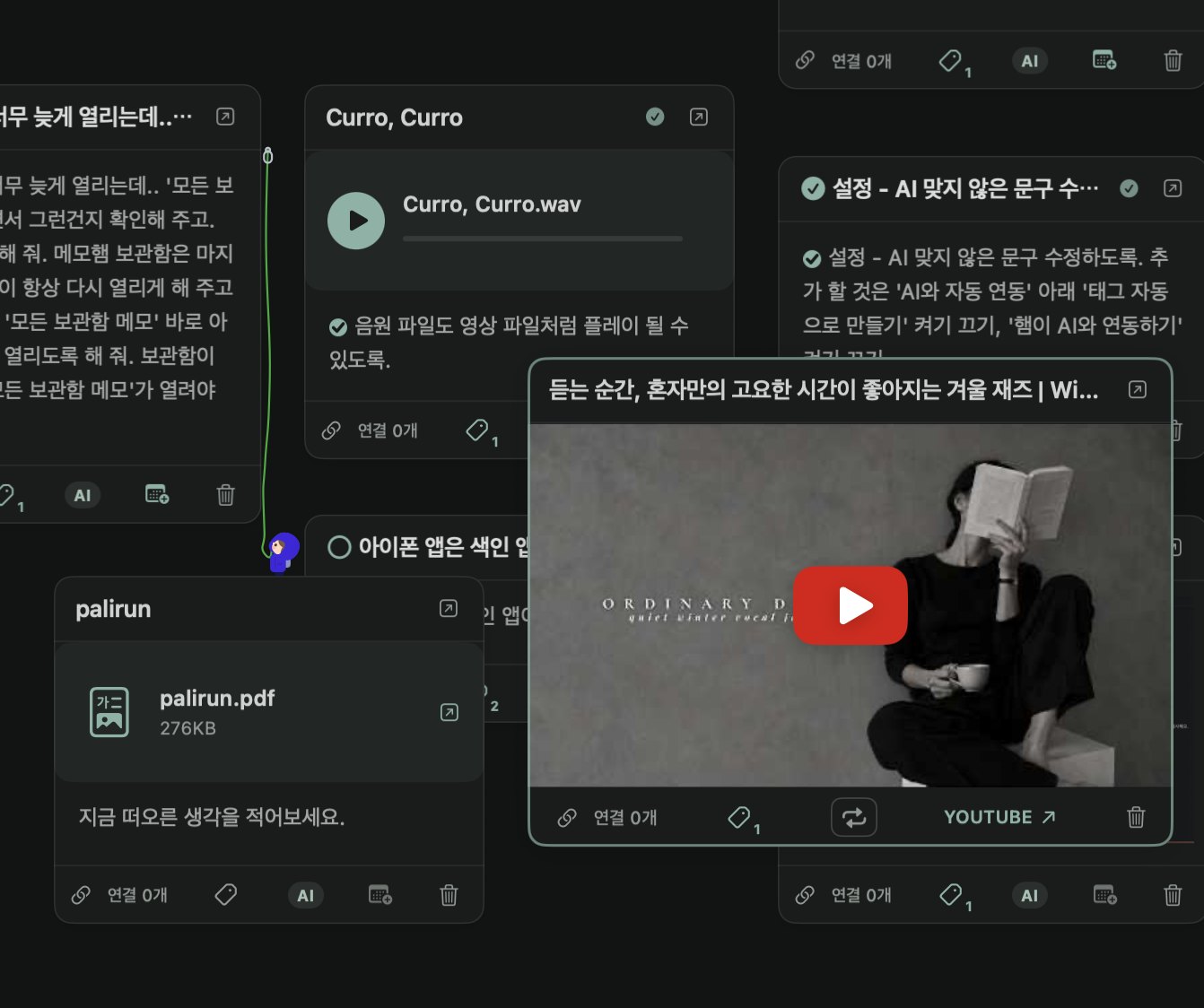
PDF는 카드에서 바로 열고, 음원은 카드에서 듣고, 유튜브는 카드에서 봐요. 그 옆 메모에 떠오른 생각을 적고 서로 이어 두세요.Open a PDF, listen to audio and watch YouTube right in their cards. Write what comes to mind in the memo beside them, and link them together.
AI
AI의 생각을 메모 옆에AI’s thoughts beside your memo
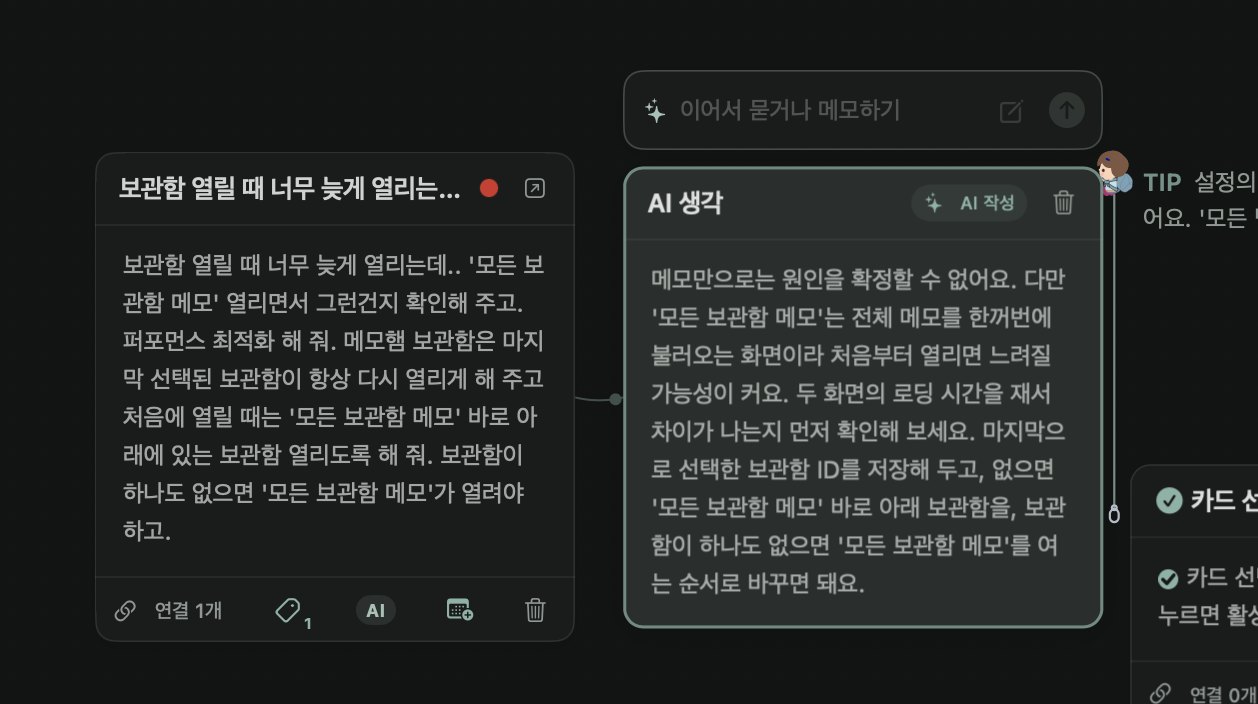
카드의 AI 단추를 누르면 바로 옆에 ‘AI 생각’ 카드가 생기고 메모와 이어져요. 메모와 AI의 생각을 나란히 보며, 위 칸에 이어서 묻거나 떠오른 생각을 메모로 남겨요.Press a card’s AI button and an “AI thought” card appears right beside it, linked to your memo. See your memo and the AI’s thoughts side by side, then ask a follow-up or jot down your own note in the box above.
01
책장 캔버스Bookshelf canvas
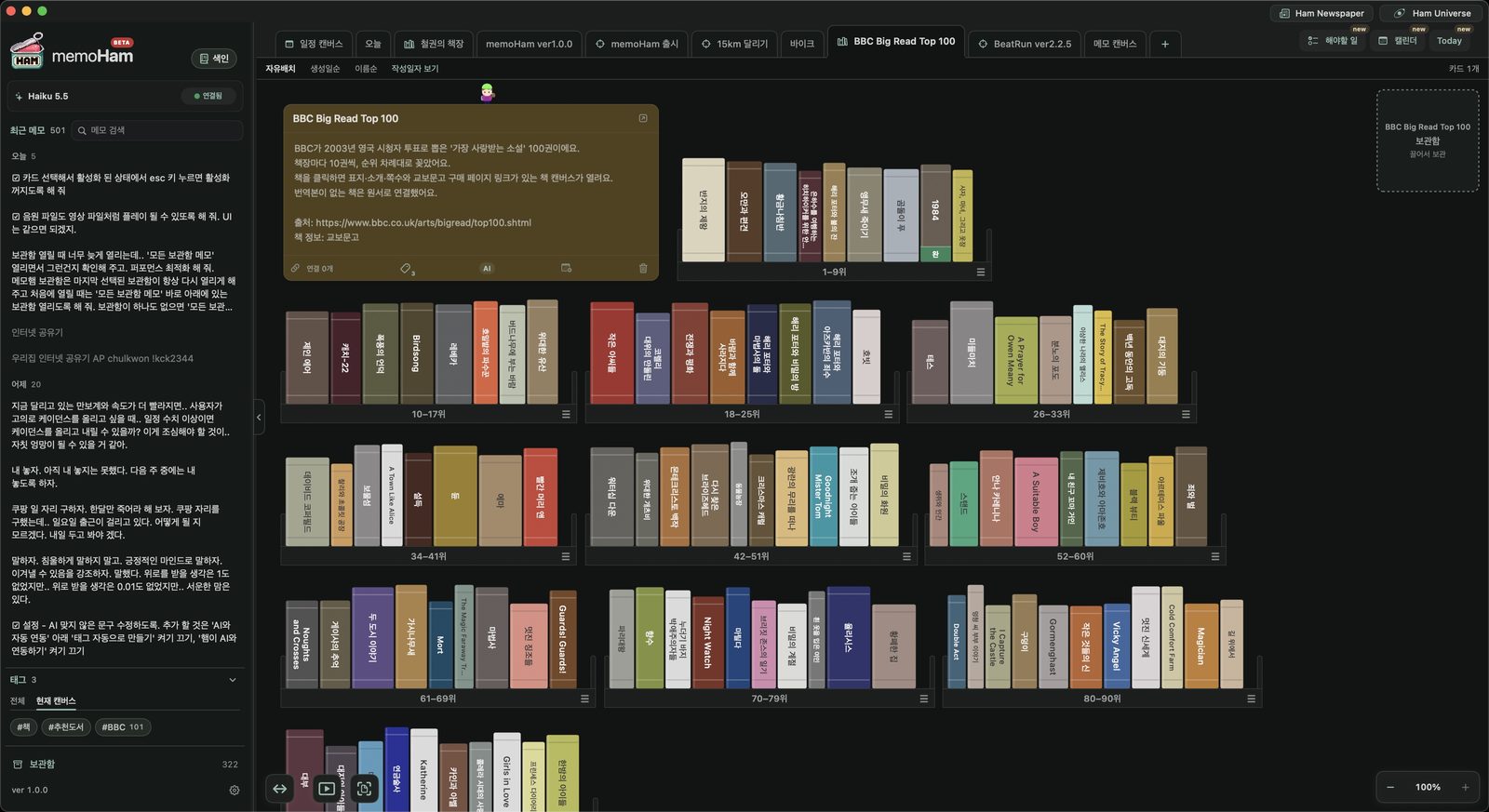
BBC Big Read Top 100을 책장으로 꽂았어요. 책을 누르면 표지와 소개가 있는 책 캔버스가 열려요.이 캔버스 받기 →The BBC Big Read Top 100 on shelves. Click a book to open its own canvas with the cover and description.Get this canvas →
02
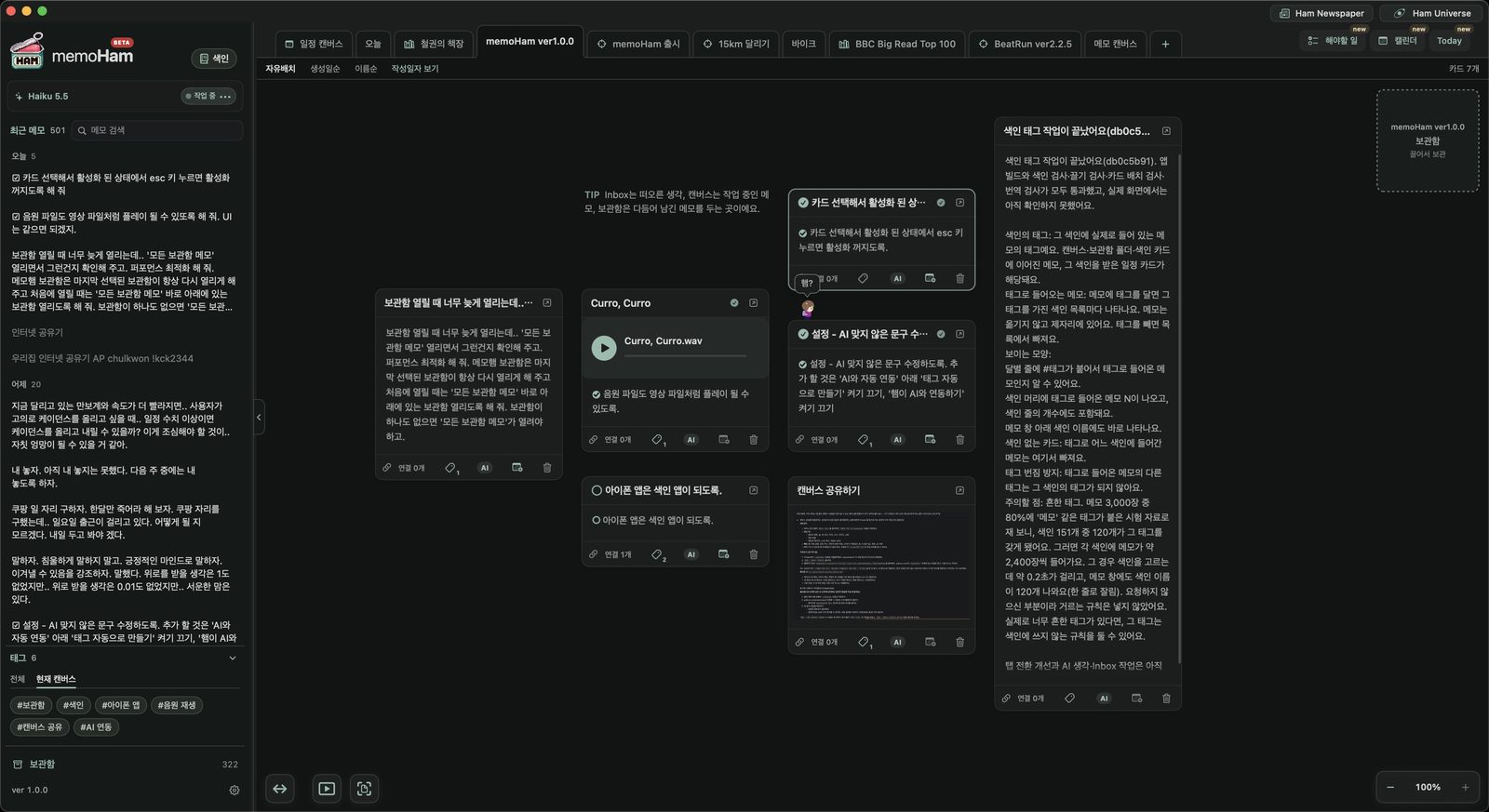
캔버스Canvas
카드를 자유롭게 놓고 잇고, 체크박스로 할 일을 챙겨요. 왼쪽에는 최근 메모와 태그가 모여 있어요.Lay out cards freely, link them and keep tasks with checkboxes. Recent memos and tags gather on the left.
03
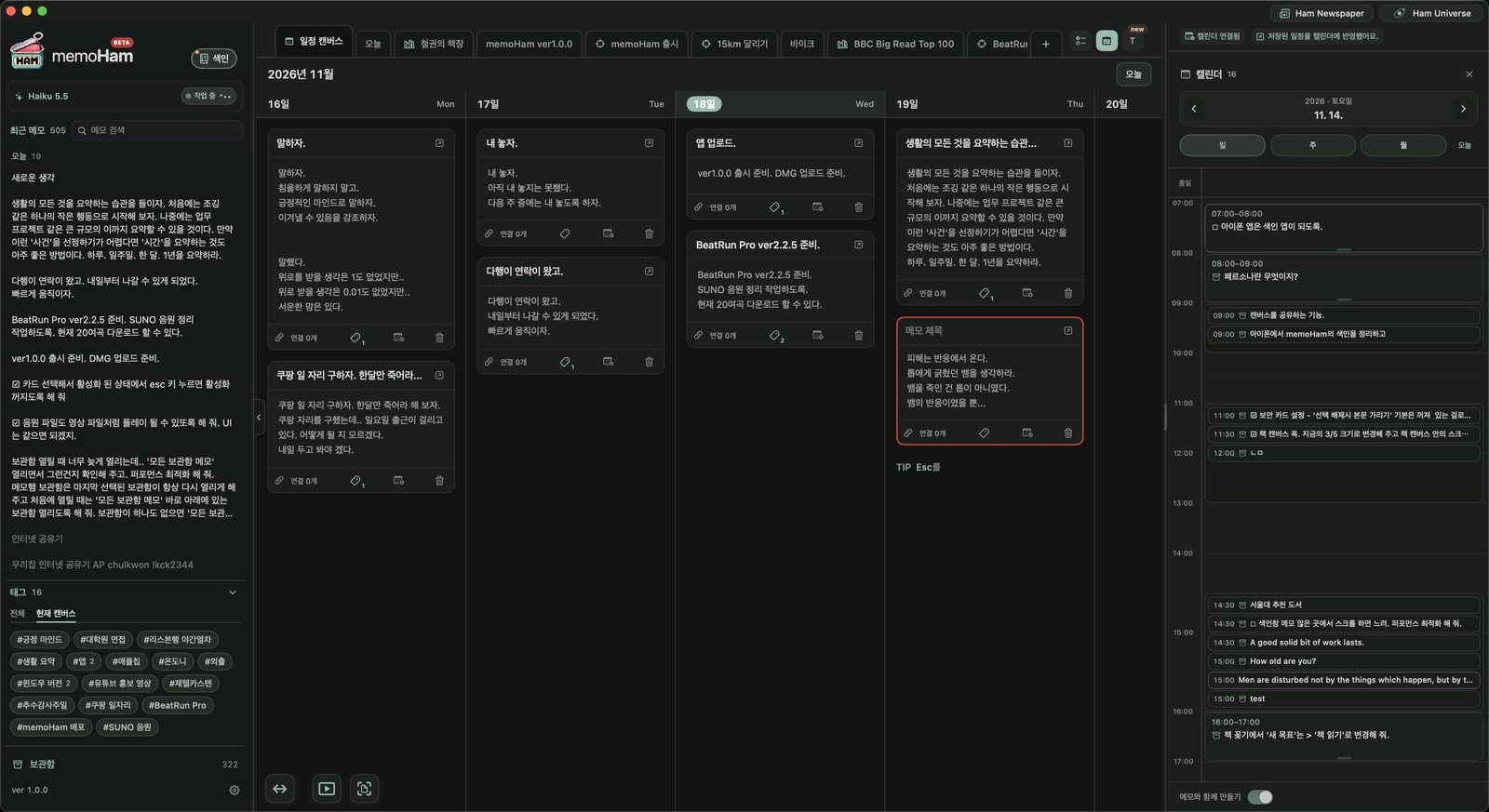
일정 캔버스Schedule canvas
날짜별로 메모를 보고, 오른쪽 캘린더의 시간에 놓아요.See memos by day and place them at a time on the calendar beside them.
04
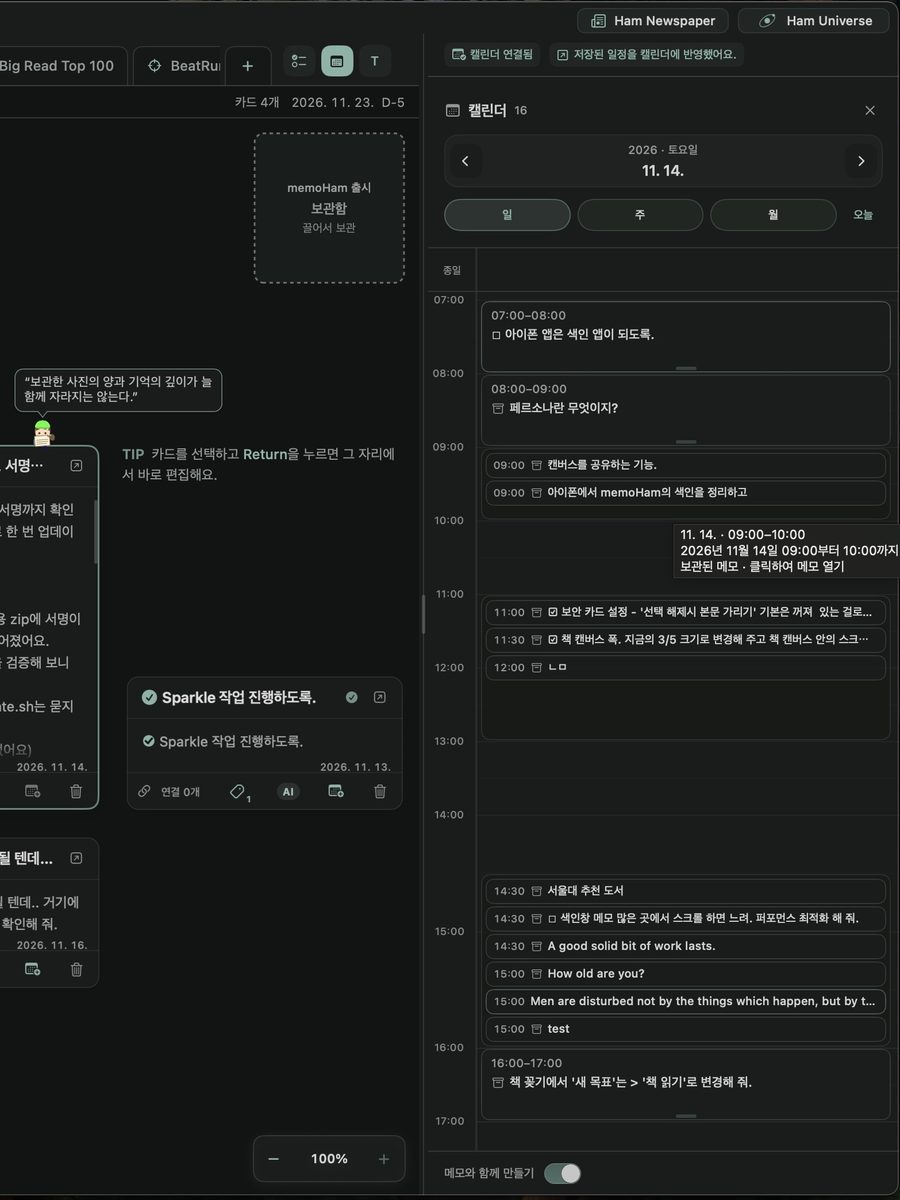
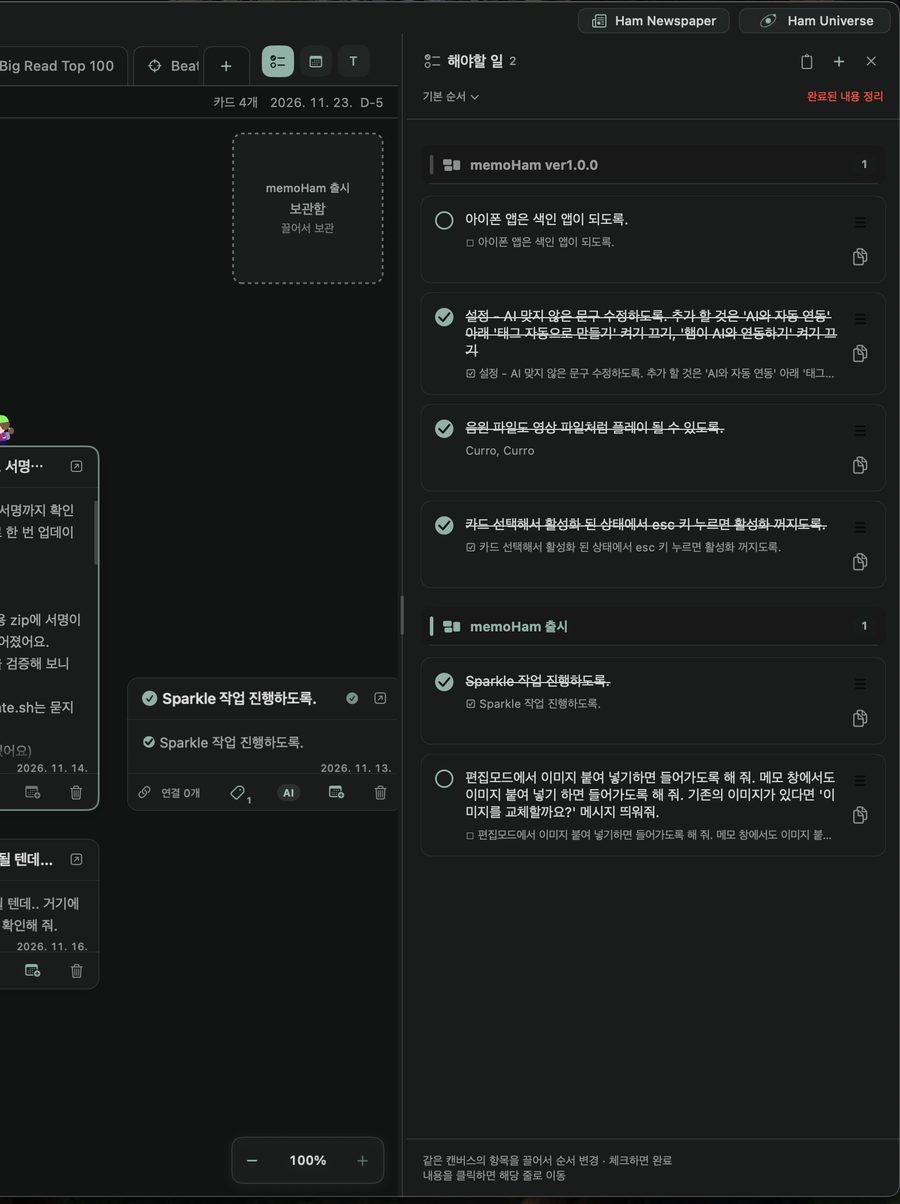
캘린더와 해야 할 일Calendar and to-do
메모를 시간에 놓으면 Mac 캘린더에도 반영돼요. 캔버스마다 흩어진 체크박스는 한 목록에 모여요.Put a memo at a time and it shows up in your Mac calendar. Checkboxes scattered across canvases gather in one list.
05
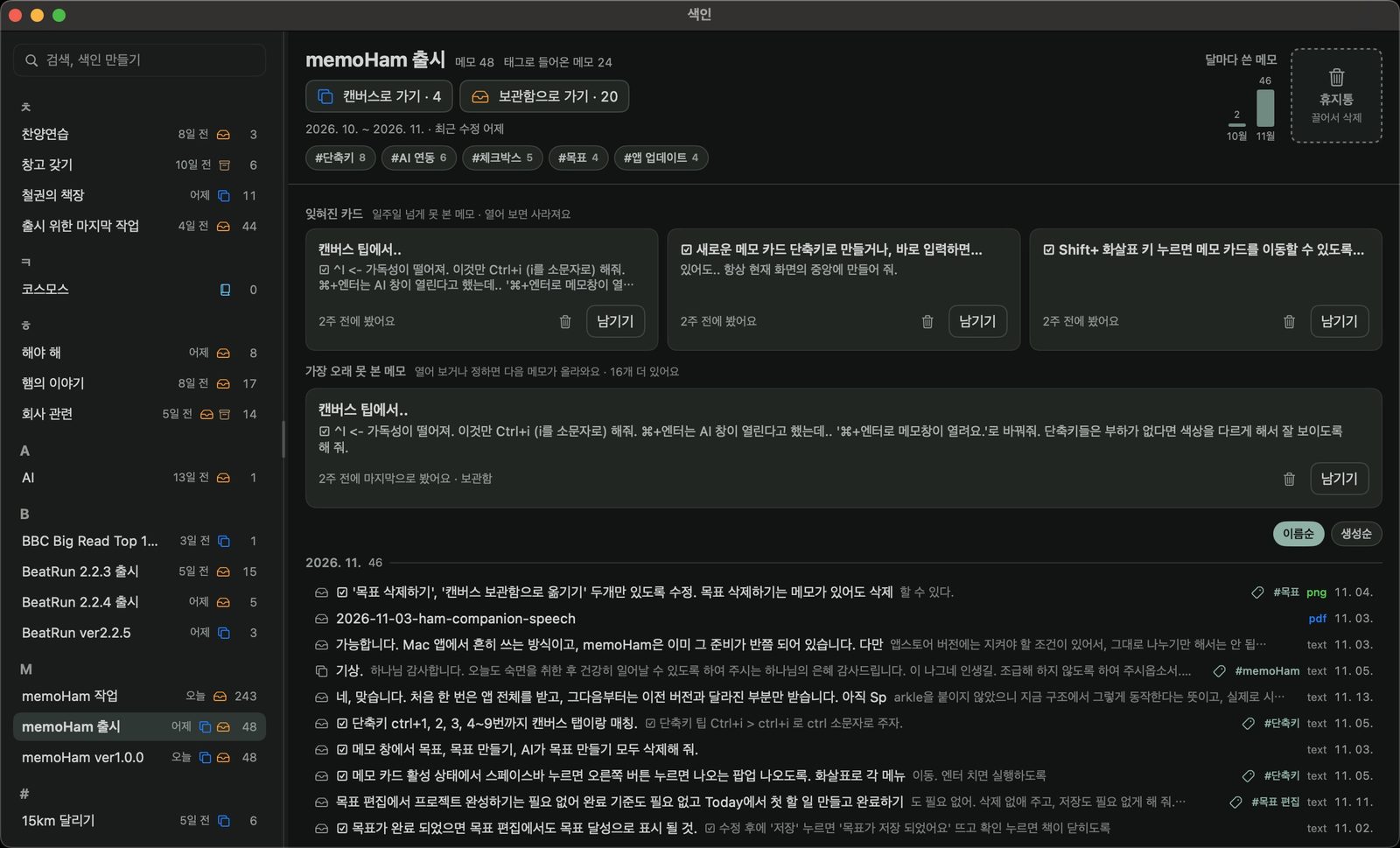
색인Index
이름과 태그로 메모를 모아 보고, 오래 못 본 카드를 다시 만나요.Browse memos by name and tag, and meet cards you haven’t seen in a while.
06
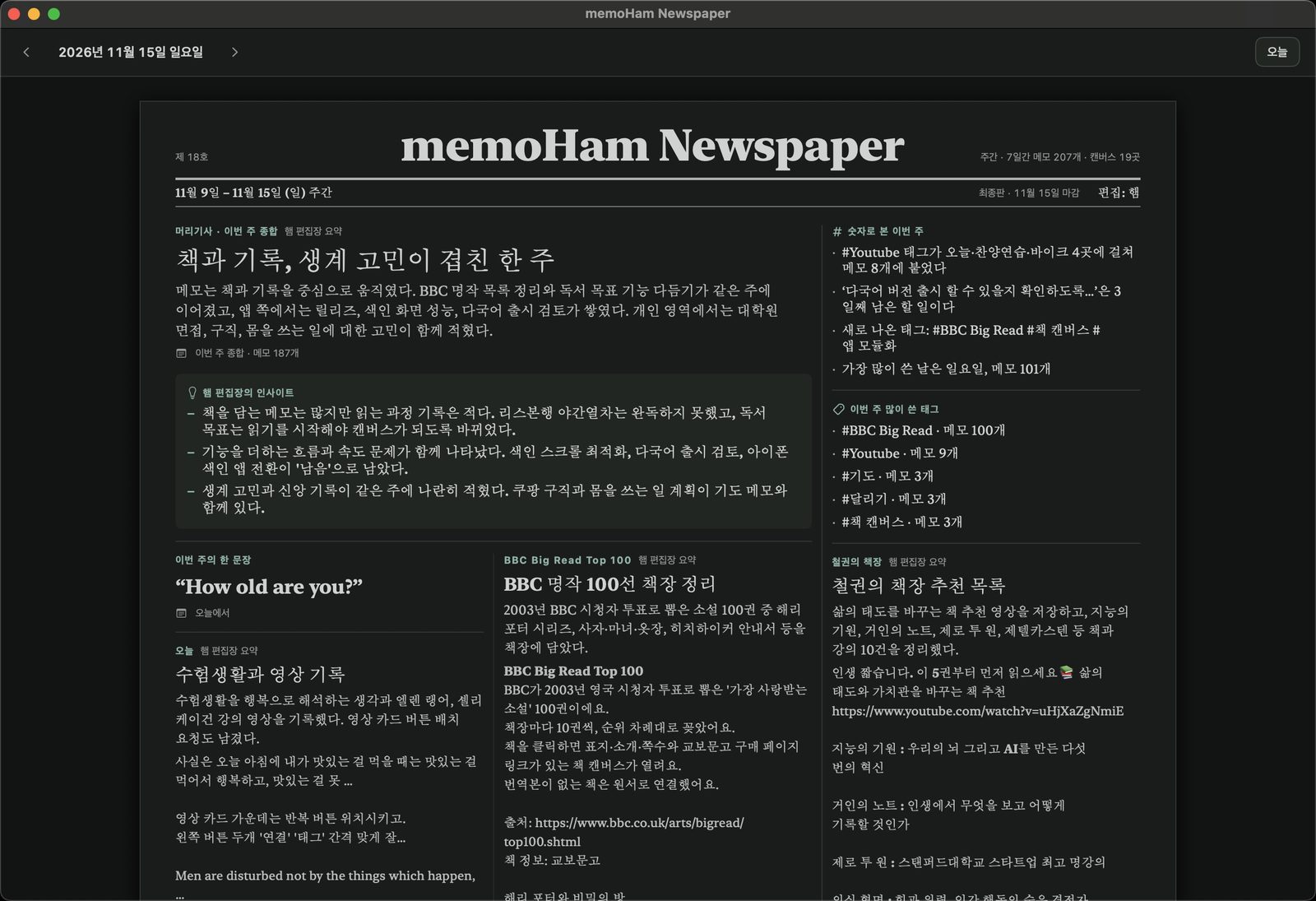
Ham NewspaperHam Newspaper
햄 편집장이 한 주의 메모를 신문으로 엮어요.Ham, as editor, turns your week of memos into a newspaper.
07
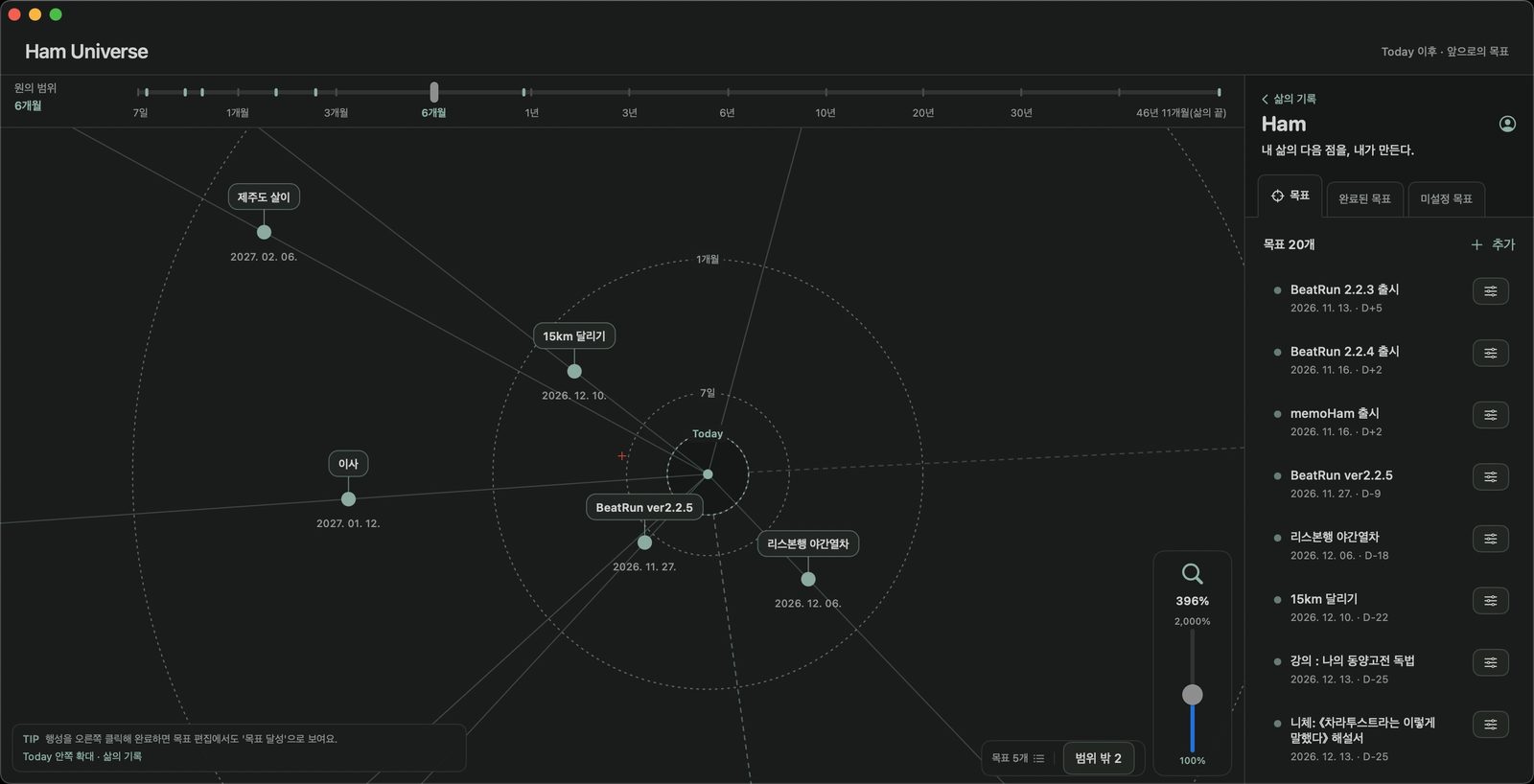
Ham UniverseHam Universe
Today를 중심으로 목표를 우주에 놓고, 기간을 바꿔 가며 봐요.Goals placed in a universe around Today, viewed across time ranges.
08
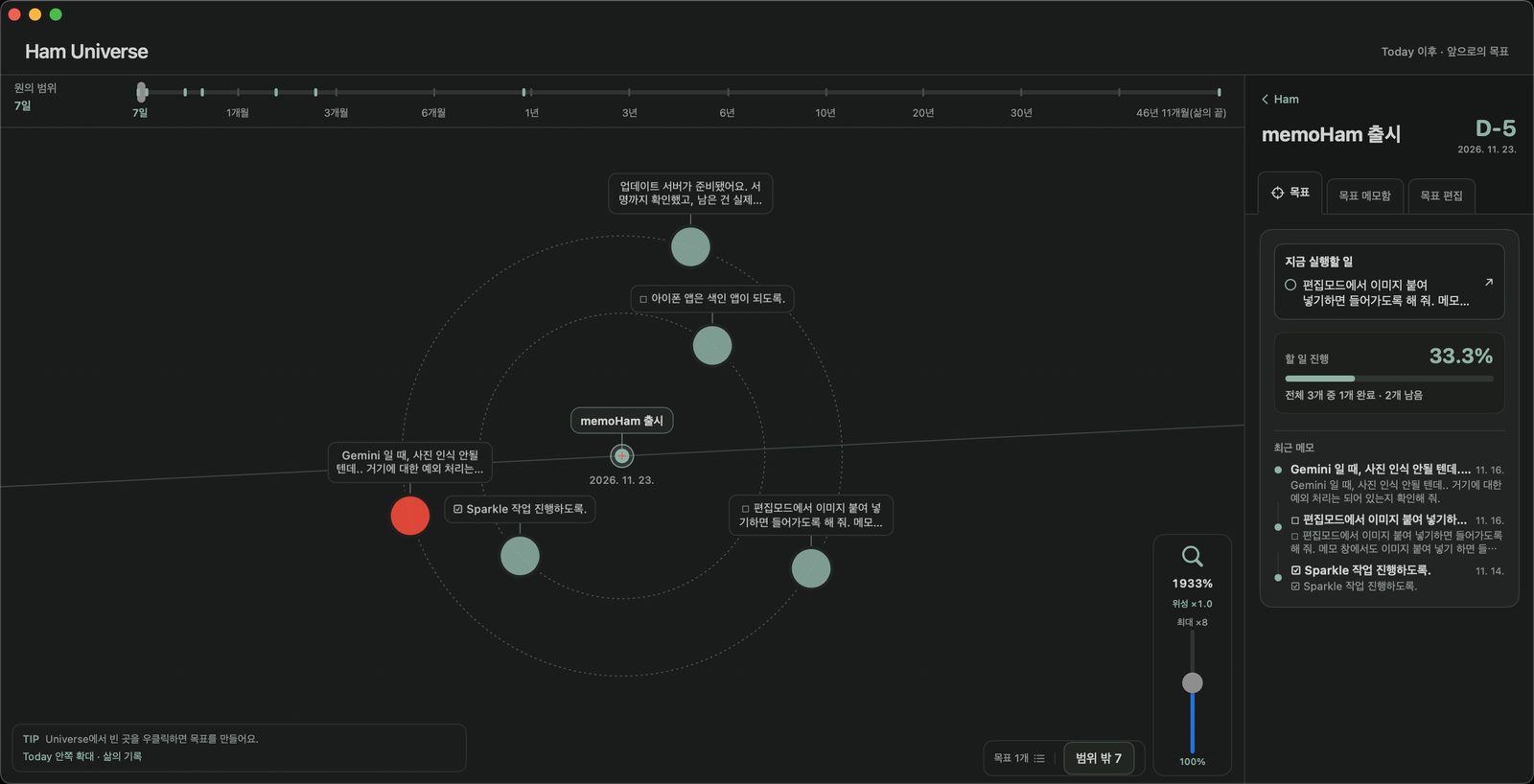
목표와 할 일A goal and its tasks
목표를 고르면 할 일이 위성처럼 돌고, 진행률이 함께 보여요.Pick a goal and its tasks orbit it like satellites, with progress alongside.
09
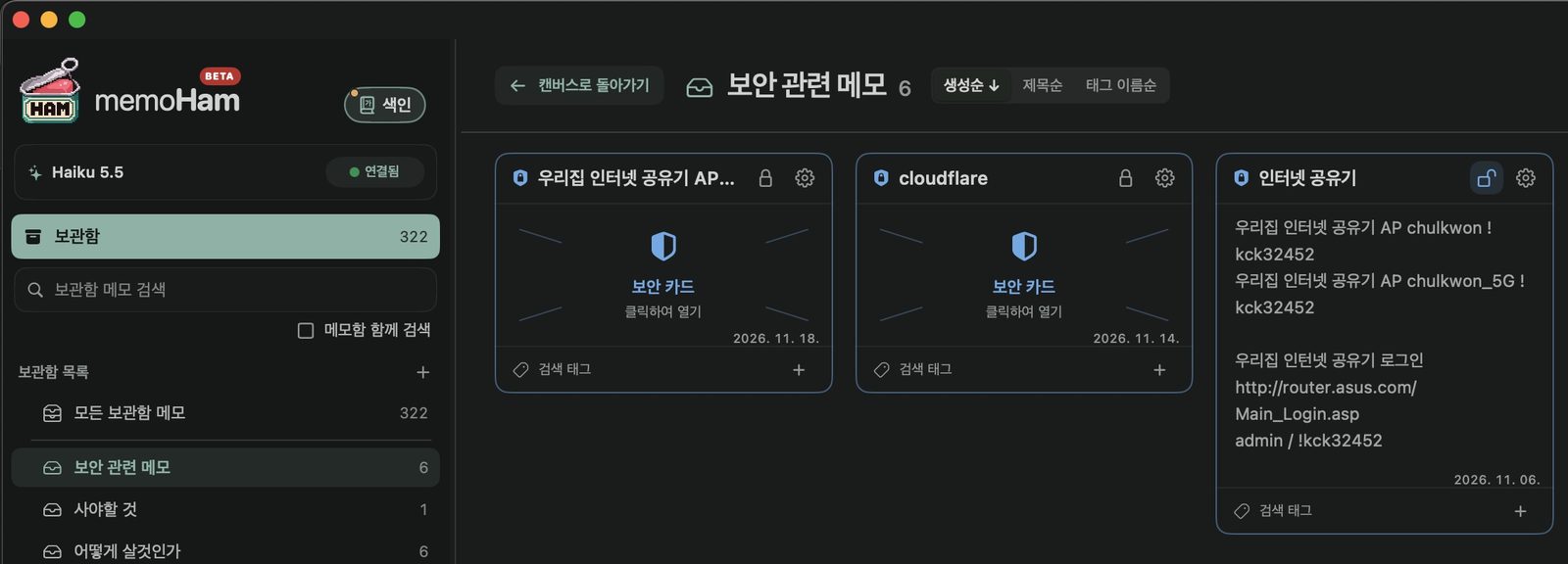
보안 카드Secure cards
잠근 카드는 클릭해야 열리고, AI에는 보내지 않아요.Locked cards open only when you click them, and are never sent to AI.
기능Features
생각을 놓치지 않고, 이어 가고, 다시 만나요Catch a thought, connect it, meet it again
캔버스 위의 카드Cards on a canvas
빈 곳에서 바로 쓰고, 끌어 옮기고, 카드끼리 잇고 태그로 묶어요. 캔버스는 탭으로 여러 개 둘 수 있어요.Type anywhere, drag cards around, link them and group them with tags. Keep as many canvases as you like in tabs.
화면 옆 InboxInbox at the screen’s edge
화면 가장자리에 숨어 있다가 마우스를 대면 열려요. 떠오른 생각, 파일, 복사한 글을 바로 던져 두세요.It waits at the edge of your screen and slides open when your pointer arrives. Drop in thoughts, files and copied text as they come.
메모를 읽는 햄Ham reads along
카드 위를 걷고, 재료를 모으고, 물건을 만들어요. 메모를 읽고 한마디 건네고, AI를 연결하면 메모에 맞춘 반응과 태그도 줘요.Ham walks your cards, gathers and crafts, and comments on what you write. With AI connected, it reacts to each memo and suggests tags.
필요할 때만 AIAI when you want it
쓰고 있는 ChatGPT·Claude·Gemini 계정을 연결해 메모와 대화하고, 카드에 묻고, 목표를 세워요. 자동으로 묻는 일은 설정에서 끌 수 있어요.Connect the ChatGPT, Claude or Gemini account you already use to chat with a memo, ask a card, or plan a goal. Automatic requests can be turned off in Settings.
목표와 오늘Goals and Today
메모를 목표로 키우고, 오늘 할 일과 루틴, 일정을 한 화면에서 봐요. 캘린더와도 이어져요.Grow memos into goals, and see today’s tasks, routines and schedule in one place. Works with your calendar.
보관함과 색인Archive and index
다 쓴 카드는 보관함 폴더로 정리하고, 색인 창에서 오래 못 본 메모를 다시 만나요.File finished cards into archive folders, and rediscover memos you haven’t seen in a while from the index.
보안 카드Secure cards
비밀번호나 개인적인 기록은 암호화된 카드에. 잠그면 내용이 가려지고 AI에는 보내지 않아요.Keep passwords and private notes in encrypted cards. Locked cards stay hidden and are never sent to AI.
이미지·영상·음원·PDFImages, video, audio, PDF
파일을 캔버스에 놓으면 카드가 돼요. 이미지는 크게 보고, 영상과 음원은 카드에서 바로 재생해요.Drop a file on the canvas and it becomes a card. Open images full size, and play video and audio right on the card.
개인정보Privacy
메모는 당신의 Mac에Your memos stay on your Mac
메모와 파일Memos and files
메모는 이 Mac의 저장소에 저장돼요. 계정을 만들 필요가 없어요.Memos are saved in a library on your Mac. No account needed.
백업은 이 Mac과, 켜 두었다면 내 iCloud Drive에만 저장돼요. 우리 서버로는 보내지 않아요.Backups are kept on your Mac and, if you turn it on, in your own iCloud Drive. They never go to our server.
충돌과 실행 횟수 같은 진단 정보를 보내고, 메모 내용은 보내지 않아요. 설정 › 일반 › 정보에서 끌 수 있어요.Diagnostics such as crashes and launch counts are sent, never your memos. Turn them off in Settings › General › About.
하루 한 번 전날 만든 카드 수와 연결한 AI 서비스·모델 이름(없으면 '사용 안 함')을 이 Mac의 식별 코드와 함께 보내요. 식별 코드는 Mac의 하드웨어 번호에서 앱이 만든 값이고, 하드웨어 번호 자체는 아니에요. 카드 내용은 보내지 않아요. 문의하기에도 이 코드가 함께 가요.Once a day, the app also sends how many cards were made the day before and the name of the connected AI service and model (or that none is in use), with a code for this Mac. The app makes the code from the Mac's hardware number; it isn't the number itself. Card contents are never sent. Messages sent with Contact Us include the code too.
이 사이트는 방문, 다운로드, 하루 한 번 하는 업데이트 확인을 익명으로 세요. IP 주소는 저장하지 않아요.This site counts visits, downloads and the daily update check anonymously. IP addresses are not stored.
AIAI
AI는 직접 연결한 계정으로만, 직접 요청하거나 켜 둔 기능에서만 써요.AI runs only through the account you connect, and only for what you ask or switch on.
Inbox 카드와 보안 카드는 AI에 보내지 않아요.Inbox cards and secure cards are never sent to AI.
캔버스 받기Get a canvas
BBC Big Read Top 100
BBC가 영국 시청자 투표로 뽑은 ‘가장 사랑받는 소설’ 100권을 책장 11칸에 꽂아 둔 캔버스예요. 책을 누르면 표지·소개·쪽수가 있는 책 캔버스가 열려요. memoHam으로 가져와 읽은 책을 표시해 보세요.The 100 “best-loved novels” chosen by the BBC’s UK readers’ vote, shelved on 11 bookshelves. Click a book to open its canvas with the cover, description and page count. Bring it into memoHam and mark the books you’ve read.
memoHam이 설치된 Mac에서 열려요. 받은 파일은 두 번 클릭하거나 memoHam의 파일 › 캔버스 가져오기로 열어요.Opens on a Mac with memoHam installed. Double-click the downloaded file, or use File › Import Canvas in memoHam.
어떤 Mac인지 모르겠다면: 화면 왼쪽 위 Apple 메뉴 › 이 Mac에 관하여에서 ‘칩’이 보이면 Apple 칩, ‘프로세서’에 Intel이 보이면 Intel이에요.Not sure which Mac you have? Open the Apple menu › About This Mac. If you see “Chip”, it’s Apple silicon; if “Processor” says Intel, it’s Intel.
내려받은 파일(.dmg)을 열어요.Open the downloaded .dmg file.
memoHam을 응용 프로그램 폴더로 끌어 놓아요.Drag memoHam into the Applications folder.
응용 프로그램에서 memoHam을 열어요. Apple의 확인(공증)을 받은 앱이라 바로 열려요.Open memoHam from Applications. It’s notarized by Apple, so it opens right away.
새 버전이 나오면 앱이 알려 주고, 확인을 누르면 업데이트돼요. macOS 14 이상 · 버전 1.0.5When a new version is out, the app lets you know and updates when you agree. macOS 14 or later · Version 1.0.5
 memoHam